Developing Ember Addons: Next Generation CSS with PostCSS
My Goals:
A) In an (Ember CLI) addon - add PostCSS processing to my (Ember CLI) application's build (and utilize a few selected PostCSS plugins for conversion of upcoming CSS syntax for today's browsers). I am digging PostCSS! I'm very satisfied using next generation CSS syntax in my applications today.
B) To move common styles out of various applications and into one single Ember CLI addon. (I still want to continue using PostCSS).
I ran into a snag, the Ember CLI addon to process I used did not Just Work™ as I hoped.
I have used Broccoli as a build pipeline for a JavaScript library, So I thought - "How hard could it be?"
I found that it is not trivial. Fortunately, there are other developers who have already crossed this bridge. I found help in the embercommunity.slack.com chatrooms (#ember-cli and #need-help), sign up here.
The question of "Where in the addon do I put my styles?" did confused me. I tried using addon/styles/addon.css then tried app/styles/addon.css vs. app/styles/app.css. What surpised my was that when I put styles into addon/my-file.css and processed it with broccoli-postcss (an npm module) the styles were built into the dist/vendor.css file. At first, this didn't make sense to me. My assumption was that files in the addon's app directory would be merged with the files in the consuming application's app directory. However, that was not the case.
Someone in the chat channel, posted a link to an issue for an ember-cli thread that went back a year or so; which included discussion about how styles behave in addons as well as what magic surrounded processing CSS in an Ember CLI addon. So, my first thought was - "avoid the magic"; like I avoid the plague. So, I continued to setup a customized build solution in a new addon (for common styles); and to simply use CSS files within a styles directory in the addon root directory. That worked for me. Well it did seem that I should begin to look for a pattern in existing Ember addons that include CSS styles as the primary solution, like a UI kit.
Apparently, it's a thing to place CSS files in an addon inside the app directory. And by doing so, the CSS files are built into the dist/vendor.css file. Ok, that's how the magic works, nice :) - it follows that the consuming applications can import the addon's vendor styles into the application's own vendor directory.
Perhaps I have a handle on unravelling this "mystery" of where styles go, how styles are built, and how a consuming application imports the addon's stylesheets. (This was not obvious at first.)
I thought "oh, I should build an addon for processing PostCSS, for addon development". Well, the solution was less than 100 lines of code. Maybe it's better to just use this solution as boilerplate code instead of creating yet another addon. (emberaddons.com already has over 2,000 NPM modules.)
I read an article, titled Kill Your Dependencies, which emphasized owning code that you can, exercising caution when selecting a dependency, and advocated responsibility for library developers. At this point, I discouraged myself from writing Yet Another Library™ for processing PostCSS. It's responsible, for now, to simply share my solution and to explain how Ember developers can customize a Broccoli build pipeline, within an Ember CLI addon, as a solution for processing CSS, perhaps with PostCSS.
My Use Cases (Wish List)
- I want to use an Ember CLI Addon as a library for common styles for various applictions that can share a common set of styles. This addon will become the shared styles for a group of application engines within the platform I work on.
- I don't want to publish this addon on NPM, I want to use a URL to the git repository.
- It would be great if I could distribute the CSS file and have a common URL to load the styles from, so that the browser caches common URL.
- As the applications grow, I want to remove common styles from various applications into this library of common styles.
- I like versioned dependencies, even for a CSS library.
- I want to use modern CSS today, PostCSS provides that. Perhaps one day, the modern CSS I write today will become standard; then I can remove the custom processing.
- I'd like to just install the addon for my stylesheets, and the CSS should Just Work™. I'm ok with owning that.
If you're curious about how this solution turned out for me…
Once I understood how Ember CLI addons proccess CSS in the build pipeline it was fairly simple to add custom processing with Broccoli.
TLDR; see the repositories below:
The xyz-styles addon is utilized by the xyz-foundation app.
PostCSS processing in an Ember CLI Addon
Below is an explaination the solution I found, starting from the end of the story (the part where it just works).
First an application needs to install the addon (for common styles).
ember install git+ssh://git@gitlab.com:pixelhandler/xyz-styles.git
This command results in adding dependencies to my package.json. I moved the 'styles addon' to dependencies (from devDependencies):
The output was…
version: 2.3.0
Installed packages for tooling via npm.
installing xyz-styles
install packages autoprefixer, broccoli-funnel, broccoli-merge-trees, broccoli-postcss, postcss-cssnext, postcss-import
Installing packages for tooling via npm..caniuse-api: Generation ok
Installed packages for tooling via npm.
Installed addon package.
In order for this command to work, the addon needed a blueprint…
/* jshint node: true */
/* global module */
module.exports = {
  description: 'xyz-styles',

  normalizeEntityName: function () {},

  afterInstall: function () {
    return this.addPackagesToProject([
      { name: 'autoprefixer', target: '^6.3.3' },
      { name: 'broccoli-funnel', target: '^1.0.1' },
      { name: 'broccoli-merge-trees',target: '^1.1.1' },
      { name: 'broccoli-postcss', target: '^2.1.1' },
      { name: 'postcss-cssnext', target: '^2.4.0' },
      { name: 'postcss-import', target: '^8.0.2' }
    ]);
  }
};
My afterInstall hook in the index.js file adds required dependencies for processing CSS files using PostCSS and a couple plugins for cssnext and import.
Learn more about Ember CLI's Addon Hooks.
With these NPM modules in place, this "xyz-styles" addon can utilize them to process the CSS which utilize next generation CSS syntax.
An Ember CLI addon uses it's index.js file to provide hooks for the consuming application. The consuming application can process the modern CSS syntax provided within the addon's code though the included hook. This hook in the addon is used by the consuming applicaiton as the entry point to build the stylesheets into the application's vendor.css file. The vendor CSS will be imported into the consuming Ember application's vendor styles.
Below is the xyz-styles/index.js file:
/* jshint node: true */
/* global require, module */
'use strict';

module.exports = {
  name: 'xyz-styles',

  getCssFileName: function () {
    return this.name + '.css';
  },

  isAddon: function () {
    var keywords = this.project.pkg.keywords;
    return (keywords && keywords.indexOf('ember-addon') !== -1);
  },

  included: function (app) {
    this._super.included(app);
    if (!this.isAddon()) {
      app.import('vendor/' + this.getCssFileName());
    }
  },

  treeForVendor: function (node) {
    if (this.isAddon()) { return node; }

    var path = require('path');
    var Funnel = require('broccoli-funnel');
    var mergeTrees = require('broccoli-merge-trees');
    var compileCSS = require('broccoli-postcss');

    var styles = path.join(this.project.nodeModulesPath, this.name, 'app', 'styles');
    var inputTrees = new Funnel(styles, { include: [/.css$/] });
    var inputFile = this.getCssFileName();
    var outputFile = inputFile;
    var plugins = this.getPlugins();
    var sourceMaps = { inline: true };
    var css = compileCSS([inputTrees], inputFile, outputFile, plugins, sourceMaps);
    node = (node) ? mergeTrees([ node, css ]) : css;

    return node;
  },

  getPlugins() {
    var autoprefixer = require('autoprefixer');
    var cssnext = require('postcss-cssnext');
    var cssimport = require('postcss-import');

    return [
      { module: autoprefixer, options: { browsers: ['last 2 version'] } },
      { module: cssimport },
      { module: cssnext, options: { sourcemap: true } }
    ];
  }
};
The treeForVendor hook above utilizes the PostCSS modules and a few Broccoli.js modules - to build the CSS with the build pipeline of the consuming application. I used a getPlugins method to setup the options for the broccoli-postcss module to compile the CSS with.
The proccesing by the included hook will only occur in the case where there is a consuming app including the addon. There are two points of interest… when the consuming application includes the addon…
- using the
treeForVendorhook, the addon'sapp/xyz-styles.cssfile is processed and written tovendor/xyz-styles.css, and - the processed styles are imported using
app.importwithin theincludehook of the addon. That's it.
What if I want to build the styles without a consuing app?
In the example repositories, linked above (see TLDR;) - the xyz-foundation application consumes the xyz-styles addon. What if I want to share the processed styles with a older application, that is not using Ember CLI yet? The ember-cli-build.js file is the build recipe for the addon, including its "dummy" (or test) application. This build recipe is not used by a consuming application. So I could use it during development to build a distribution CSS file from this styles (library) addon. Potentially, Ember CLI's build could be used to build generic CSS libraries too, nice :)
Notice that the ember-cli-build.js file is very similar to the index.js file…
/*jshint node:true*/
/* global require, module */
var EmberAddon = require('ember-cli/lib/broccoli/ember-addon');
var autoprefixer = require('autoprefixer');
var cssnext = require('postcss-cssnext');
var cssimport = require('postcss-import');
var Funnel = require('broccoli-funnel');
var compileCSS = require('broccoli-postcss');
var path = require('path');

module.exports = function(defaults) {
  var options = {
    plugins: [
      { module: autoprefixer, options: { browsers: ['last 2 version'] } },
      { module: cssimport },
      { module: cssnext, options: { sourcemap: true } }
    ]
  };

  var app = new EmberAddon(defaults, { postcssOptions: options });

  var file = 'xyz-styles.css';
  var styles = path.join('./', 'app', 'styles');
  styles = new Funnel(styles, { include: [/.css$/] });
  var css = compileCSS([styles], file, 'vendor/' + file, options.plugins, { inline: false });

  return app.toTree([css]);
};
The build recipe above uses the same strategy as the build setup in the addon's index.js file. It utilizes a file xyz-styles.css as the target for input, and outputs the same filename inside the dist/vendor directory.
Next Generation CSS syntax using PostCSS
The xyz-styles addon's app/styles directory is setup with a file named xyz-styles.css as the main file to process. The build recipe utilizes a plugin, postcss-import to concatinate the files that are imported. The postcss-cssnext plugin allows the use of modern or next generation CSS syntax, like color: var(--name);.
See these example files:
- app/styles/xyz-styles.css uses the import plugin
- app/styles/colors.css uses the cssnext plugin for variable definition
- app/styles/elements.css and app/styles/classes.css assign a CSS variable
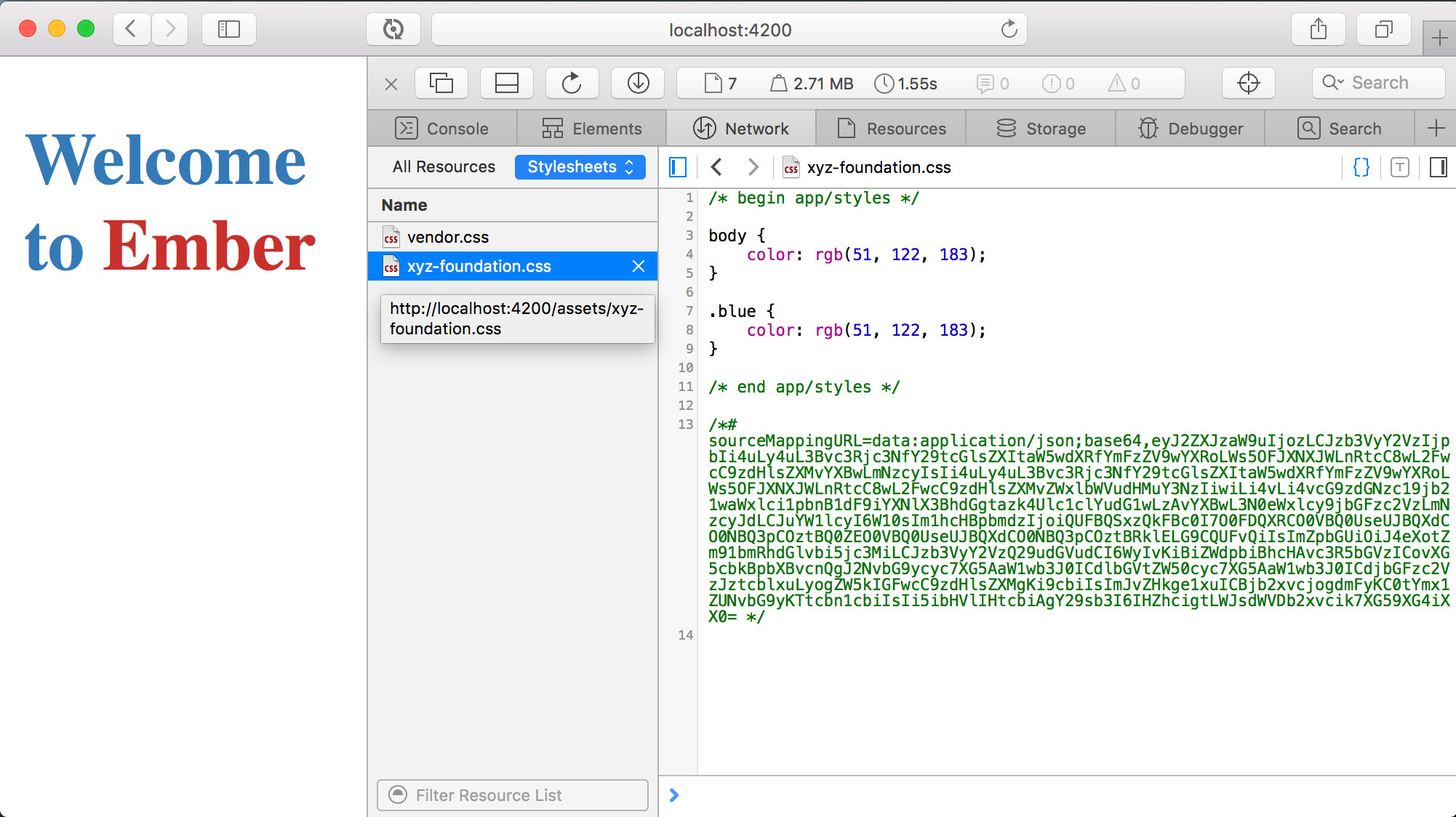
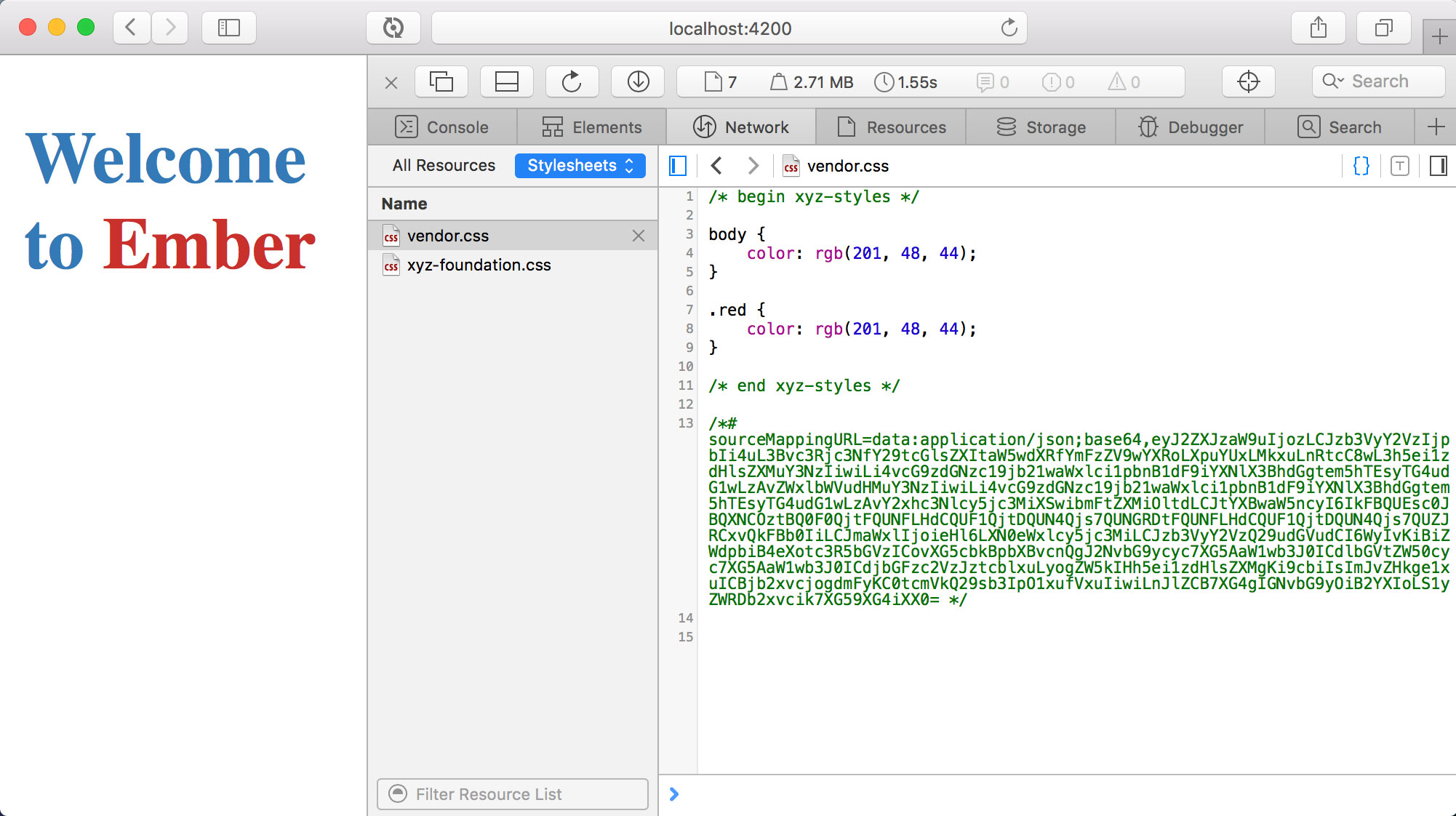
The consuming application (xyx-foundation) uses a similar file structure as the css addon (xyz-styles). This demonstrates how an Ember CLI application handles the load order for app/styles in both the application and and addon codebases. By default, the styles defined in the app/styles directory of the application, are built into the application's CSS file, xyz-foundation.css. This file is loaded after the CSS imported from the addon(s) - which are built into the vendor.css file. This default order of loading styles in the applicaiton's index.html file ensures that the vendor CSS styles are the base and the applicaiton's CSS styles can redefine or extend those vendor style declarations from withing the applicaiton's own CSS app.css file(s).
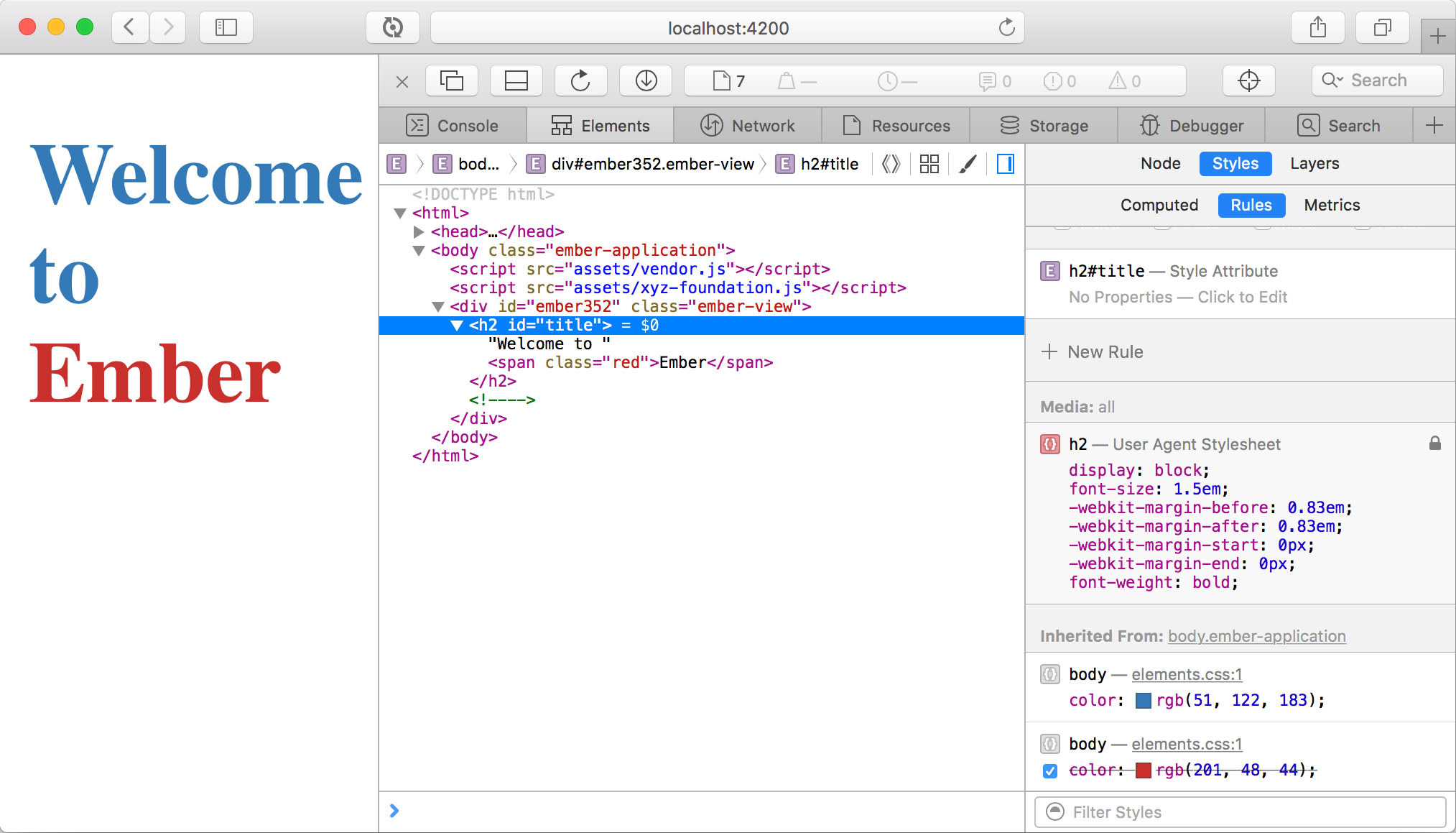
In this example, the xyz-foundation app defines a body style with the color as blue. And the addon, xyz-styles, also defines the body style but with color as red. The foundaiton app defines a CSS class named blue and the styles addon defines a CSS class named red. In the foundation application's template, app/templates/application.hbs, these classes can be used.
<h2 id="title">Welcome to <span class="red">Ember</span></h2>
The red class above is introduced to the application's vendor CSS by the styles addon. The title text is blue since the vendor CSS set the text color to red, but the application's CSS defines the body text as blue.