Develop a RESTful API Using Node.js With Express and Mongoose
Nouns
Products
There a many configurations for setting up a product to sell online, some with no options, with multiple configurable options, or groups of products. For this example I will use one of my favorite things, a t-shirt. This type of product can be configured with size and color options, e.g. Black - Large, or Red - Medium; specific material variations would be represented as separate products, like long- vs. short-sleeves.
Product attributes include:
Id,
Title,
Description,
Images: [ { Kind, URL } ],
Categories: [ { Name } ],
Style: Number,
Varients: [
  {
    Color,
    Images: [
      { Kind, URL }
    ],
    Sizes: [
      { Size, Available, SKU, Price }
    ],
  }
]
JSON data may be represented like so:
{
  "title": "My Awesome T-shirt",
  "description": "All about the details. Of course it's black.",
  "images": [
    {
      "kind": "thumbnail",
      "url": "images/products/1234/main.jpg"
    }
  ],
  "categories": [
      { "name": "Clothes" },
      { "name": "Shirts" }
  ],
  "style": "1234",
  "variants": [
    {
      "color": "Black",
      "images": [
        {
          "kind": "thumbnail",
          "url": "images/products/1234/thumbnail.jpg"
        },
        {
          "kind": "catalog",
          "url": "images/products/1234/black.jpg"
        }
      ],
      "sizes": [
        {
          "size": "S",
          "available": 10,
          "sku": "CAT-1234-Blk-S",
          "price": 99.99
        },
        {
          "size": "M",
          "available": 7,
          "sku": "CAT-1234-Blk-M",
          "price": 109.99
        }
      ]
    }
  ],
  "catalogs": [
      { "name": "Apparel" }
  ]
}
The above object has a variety of types composing a document that should bring up some challenges in learning how to store and update the document in a MongoDB database. The first thing I needed to do was install MongoDB (see the quickstart guide). To get to know the database I tried out using Mongo in the console.
I'll need to define the Web service urls to interact with the data via REST like so...
- /products - list
- /products/:id - single
Data: MongoDB using Mongoose with Express framework running on Node.js
For installation of Node.js, NPM, and Express see:
Also there are plenty of links at the end of the article to learn about this stack.
Working with data using the Mongoose package in node, I will need to research storing JSON documents. The Mongoose documentation outlines the use of schema types and embedded documents; so these can be integrated into a product model to store the product JSON above. Models are defined by passing a Schema instance to mongoose.model.
A Node App Running Express to Access Data using a RESTful Web Service
I found that a section of 'Backbone Fundamentals' has an example application which is built using this same stack : Node.js, Express, Mongoose and MongoDB. I reviewed the example methods to GET, POST, PUT and DELETE. Then I got started with an instance of the express.HTTPServer.
I created a file app.js and added the following JavaScript code:
var application_root = __dirname,
    express = require("express"),
    path = require("path"),
    mongoose = require('mongoose');

var app = express.createServer();

// Database

mongoose.connect('mongodb://localhost/ecomm_database');

// Config

app.configure(function () {
  app.use(express.bodyParser());
  app.use(express.methodOverride());
  app.use(app.router);
  app.use(express.static(path.join(application_root, "public")));
  app.use(express.errorHandler({ dumpExceptions: true, showStack: true }));
});

app.get('/api', function (req, res) {
  res.send('Ecomm API is running');
});

// Launch server

app.listen(4242);
In the above code, the line beginning with var loads the modules needed for the API, and app = express.createServer() creates the Web server. The Web server can also serve static files in a public directory, the line in the configure block app.use(express.static(path.join(application_root, "public"))); sets up the public directory to use static files. The code, mongoose.connect('mongodb://localhost/ecomm_database');, hooks up the database. All I needed to do is name the database, in this example I used the name: 'ecomm_database'. With MongoDB is setup and running, the actual database is automatically generated. To run mongod, on the command line I needed to execute the command:
mongod run --config /usr/local/Cellar/mongodb/2.0.1-x86_64/mongod.conf
Since I installed MongoGB on OSX Lion, the above command was printed out following the installation on my MacBook.
The code app.listen(4242); sets up the server to respond to the URL: http://localhost:4242. Once mongod is running, to start up the server genereated with the app.js file... I executed node app.js on the command line.
Now, I have a folder named 'ecomapi' and inside this directory is the 'app.js' file and a directory named 'public' which has an 'index.html' file. With the static index.html file I can load the data using jQuery which I am linking to on a CDN. Later I will be able to try out AJAX calls to create products using my browser's JavaScript console.
ecomapi
|-- app.js
`-- public
    `-- index.html

<!DOCTYPE html>
<html lang="en">
  <head>
    <meta charset="utf-8">
    <title>API index</title>
  </head>
  <body>
    <section>
      <h1>Nouns...</h1>
      <p>
        /products<br>
        /products/:id
      </p>
    </section>
    <script src="http://cdnjs.cloudflare.com/ajax/libs/jquery/1.7.1/jquery.min.js"></script>
  </body>
</html>
In my browser I can load http://localhost:4242 and see that the static index.html file loads and also hitting http://localhost:4242/api spits out some text 'Ecomm API is running', which is the result of the get response:
app.get('/api', function (req, res) {
  res.send('Ecomm API is running');
});
Up to this point we have a simple server with a single get response, next I can add in the data models and REST services.
Setup a Simple Model Using CRUD (create, read, update, delete)
Following the app.configure code block, in the app.js, I added a Schema and a Product Model:
var Schema = mongoose.Schema;

var Product = new Schema({
    title: { type: String, required: true },
    description: { type: String, required: true },
    style: { type: String, unique: true },
    modified: { type: Date, default: Date.now }
});
Since I still needed to learn how to use the schema types and embedded documents that come with mongoose, I didn't add the price yet which should be set on a combination of color and size.
To use the model I created a variable ProductModel:
var ProductModel = mongoose.model('Product', Product);
Now I can add the CRUD methods:
READ a List of Products
app.get('/api/products', function (req, res){
  return ProductModel.find(function (err, products) {
    if (!err) {
      return res.send(products);
    } else {
      return console.log(err);
    }
  });
});
CREATE a Single Product
app.post('/api/products', function (req, res){
  var product;
  console.log("POST: ");
  console.log(req.body);
  product = new ProductModel({
    title: req.body.title,
    description: req.body.description,
    style: req.body.style,
  });
  product.save(function (err) {
    if (!err) {
      return console.log("created");
    } else {
      return console.log(err);
    }
  });
  return res.send(product);
});
READ a Single Product by ID
app.get('/api/products/:id', function (req, res){
  return ProductModel.findById(req.params.id, function (err, product) {
    if (!err) {
      return res.send(product);
    } else {
      return console.log(err);
    }
  });
});
UPDATE a Single Product by ID
app.put('/api/products/:id', function (req, res){
  return ProductModel.findById(req.params.id, function (err, product) {
    product.title = req.body.title;
    product.description = req.body.description;
    product.style = req.body.style;
    return product.save(function (err) {
      if (!err) {
        console.log("updated");
      } else {
        console.log(err);
      }
      return res.send(product);
    });
  });
});
DELETE a Single Product by ID
app.delete('/api/products/:id', function (req, res){
  return ProductModel.findById(req.params.id, function (err, product) {
    return product.remove(function (err) {
      if (!err) {
        console.log("removed");
        return res.send('');
      } else {
        console.log(err);
      }
    });
  });
});
NOTE: To exit your running app.js job, press control-c then re-start your updated app.js using the same command as before: node app.js
With the new product model and CRUD methods serving up a RESTful service at http://localhost:4242/api I can utilize the index.html (with jQuery)... and in my browser's console I can fiddle with my new Web service using jQuery's AJAX methods. Specifically, by loading http://localhost:4242/ and executing commands in the JavaScript console I can using ($.ajax) POST to create a new product.
jQuery.post("/api/products", {
  "title": "My Awesome T-shirt",
  "description": "All about the details. Of course it's black.",
  "style": "12345"
}, function (data, textStatus, jqXHR) {
    console.log("Post resposne:"); console.dir(data); console.log(textStatus); console.dir(jqXHR);
});
The post response is something like:
_id: "4f34d8e7f05ebf212b000004"
description: "All about the details. Of course it's black."
modified: "2012-02-10T08:44:23.372Z"
style: "12345"
title: "My Awesome T-shirt"
The _id property was added automatically, this value can be used to UPDATE, READ, or DELETE the record. Notice all the console.log() and console.dir() calls I added within the anonymous functions' 'success' callbacks. With the logging in place, I can inspect the server's response in the console or by viewing the responses on in network tab of my browser's developer tools.
To READ the product data I just created, I execute the following code in my browser's JavaScript console:
jQuery.get("/api/products/", function (data, textStatus, jqXHR) {
    console.log("Get resposne:");
    console.dir(data);
    console.log(textStatus);
    console.dir(jqXHR);
});
The above GET request reads all products; to read a specific product add the ID to the URL like so:
jQuery.get("/api/products/4f34d8e7f05ebf212b000004", function(data, textStatus, jqXHR) {
    console.log("Get resposne:");
    console.dir(data);
    console.log(textStatus);
    console.dir(jqXHR);
});
To test the UPDATE request use PUT:
jQuery.ajax({
    url: "/api/products/4f34d8e7f05ebf212b000004",
    type: "PUT",
    data: {
      "title": "My Awesome T-shirt in Black",
      "description": "All about the details. Of course it's black, and long sleeve",
      "style": "12345"
    },
    success: function (data, textStatus, jqXHR) {
        console.log("Post resposne:");
        console.dir(data);
        console.log(textStatus);
        console.dir(jqXHR);
    }
});
The above code is about the same as the the previous code I used to create the product document and store in MongoDB. However, I appended the product's description with the text: 'black, and long sleeve'.
Now, when I get the product by ID, I see the updated text added to the product description:
jQuery.get("/api/products/4f34d8e7f05ebf212b000004");
Or I can visit : http://localhost:4242/api/products/4f34d8e7f05ebf212b000004 to see the text response only.
I can also DELETE the product:
jQuery.ajax({
    url: "/api/products/4f34d8e7f05ebf212b000004",
    type: "DELETE",
    success: function (data, textStatus, jqXHR) {
        console.log("Post resposne:");
        console.dir(data);
        console.log(textStatus);
        console.dir(jqXHR);
    }
});
Now when I load http://localhost:4242/api/products/4f34d8e7f05ebf212b000004 the server response with a null response
TIP: I am using a log of console.log() and console.dir() calls within the success (anonymous) functions to view the responses from the server.
Embedded Documents for the Remaining Product Attributes
I am now adding a few items to the product model: images, categories, catalogs, variants. A t-shirt product may have many variants with size and color options; the pricing should be configured by the combination of: the selected size option which belongs to a selected color option. The product may belong one or more product catalogs, and also should have one or more associated categories.
// Product Model

var Product = new Schema({
    title: { type: String, required: true },
    description: { type: String, required: true },
    style: { type: String, unique: true },
    images: [Images],
    categories: [Categories],
    catalogs: [Catalogs],
    variants: [Variants],
    modified: { type: Date, default: Date.now }
});
The embedded documents are in square brackets (above) in the product model. I referenced the Mongoose documentation to learn how to assemble this model with embedded documents.
Below are the schema assignments that together assemble the product document to store in MongoDB. My strategy is adding one embedded document at time and updating each the CREATE and UPDATE methods, stopping and restarting the application (control-c then node app.js) with each iteration. And working out the additional code by fiddling with the same jQuery $.ajax requests, but also adding the single attribute(s) added to the post data to create a new product document in the db.
// Schemas

var Sizes = new Schema({
    size: { type: String, required: true },
    available: { type: Number, required: true, min: 0, max: 1000 },
    sku: {
        type: String,
        required: true,
        validate: [/[a-zA-Z0-9]/, 'Product sku should only have letters and numbers']
    },
    price: { type: Number, required: true, min: 0 }
});

var Images = new Schema({
    kind: {
        type: String,
        enum: ['thumbnail', 'catalog', 'detail', 'zoom'],
        required: true
    },
    url: { type: String, required: true }
});

var Variants = new Schema({
    color: String,
    images: [Images],
    sizes: [Sizes]
});

var Categories = new Schema({
    name: String
});

var Catalogs = new Schema({
    name: String
});
For example, I first added the [Images] embedded docuemnt to my product model and tested out the application by updated the AJAX post which creates the product using the same post as before but with an array of objects with the image attributes for kind and url, see below:
var Images = new Schema({
    kind: String,
    url: String
});

var Product = new Schema({
    title: { type: String, required: true },
    description: { type: String, required: true },
    style: { type: String, unique: true },
    images: [Images],
    modified: { type: Date, default: Date.now }
});
I also updated the CREATE (POST) and UPDATE (PUT) methods, adding the references to the images attribute (an embedded document) of the product model.
// CREATE a product

app.post('/api/products', function(req, res){
  var product;
  console.log("POST: ");
  console.log(req.body);
  product = new ProductModel({
    title: req.body.title,
    description: req.body.description,
    style: req.body.style,
    images: [Images]
  });
  product.save(function(err) {
    if (!err) {
      return console.log("created");
    } else {
      return console.log(err);
    }
  });
  return res.send(product);
});


// UPDATE a single product

app.put('/api/products/:id', function(req, res){
  return ProductModel.findById(req.params.id, function(err, product) {
    product.title = req.body.title;
    product.description = req.body.description;
    product.style = req.body.style;
    product.images = req.body.images;
    return product.save(function(err) {
      if (!err) {
        console.log("updated");
      } else {
        console.log(err);
      }
      return res.send(product);
    });
  });
});
Then I worked out the adding the image(s) data to my post that creates a product in the database; addming the images data array with an object like so:
jQuery.post("/api/products", {
  "title": "My Awesome T-shirt",
  "description": "All about the details. Of course it's black.",
  "style": "1234",
  "images": [
    {
      "kind": "thumbnail",
      "url": "images/products/1234/main.jpg"
    }
  ]
}, function(data, textStatus, jqXHR) {
    console.log("Post resposne:"); console.dir(data); console.log(textStatus); console.dir(jqXHR);
});
On my first of attempt of adding multiple documents to the product model, I did get errors and the server's create action failed. However, my terminal (shell) does report the errors - the app.js file uses the code app.use(express.errorHandler({ dumpExceptions: true, showStack: true })); to setup the display of errors on the command line. Also, I added some console.log calls in the post action to log the request pluse notes on the execution of saving the document. On both the browser and on the command line, all the logging indicates whether I am building the product model (using Mongoose) properly. This attempt to add the images did not save. I am not sure why, but I switched over to adding a [Categories] embedded docuemnt, then worked my way toward a completed product model with an API to CREATE, UPDATE and DELETE a single product at a time and to READ a single product or list of products in an array.
After debugging the embedded documents I added for the product models attribtues... now I can create the complete product in a post:
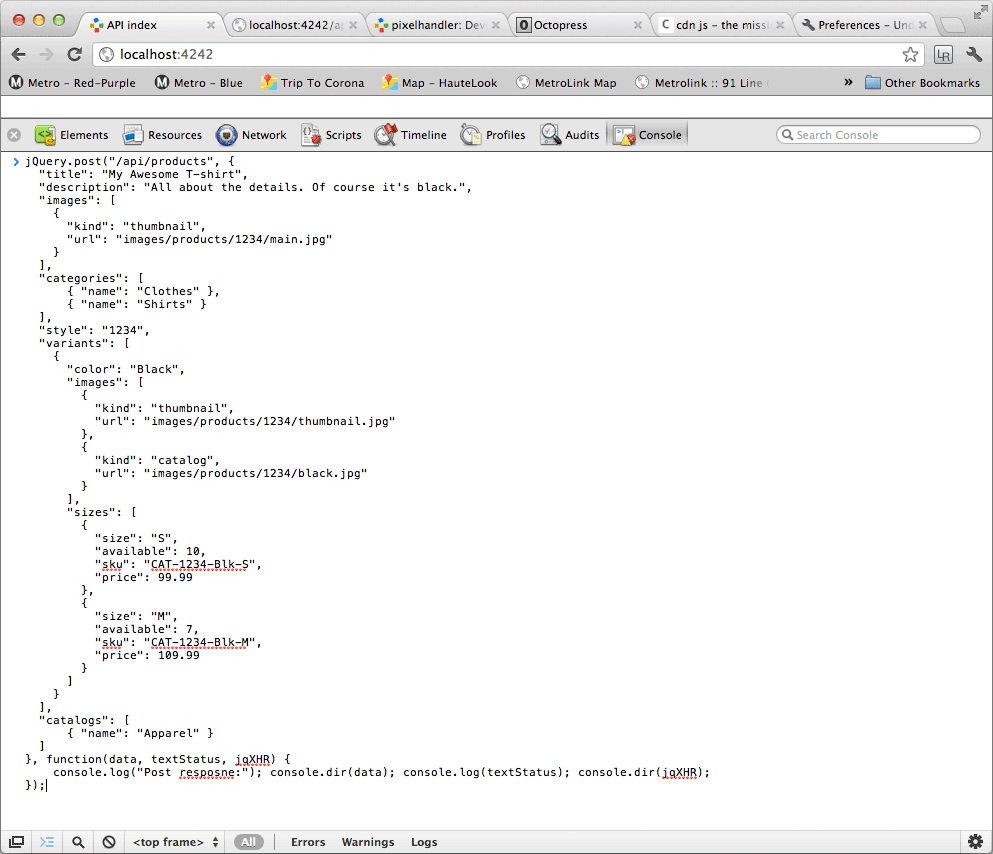
jQuery.post("/api/products", {
  "title": "My Awesome T-shirt",
  "description": "All about the details. Of course it's black.",
  "images": [
    {
      "kind": "thumbnail",
      "url": "images/products/1234/main.jpg"
    }
  ],
  "categories": [
      { "name": "Clothes" },
      { "name": "Shirts" }
  ],
  "style": "1234",
  "variants": [
    {
      "color": "Black",
      "images": [
        {
          "kind": "thumbnail",
          "url": "images/products/1234/thumbnail.jpg"
        },
        {
          "kind": "catalog",
          "url": "images/products/1234/black.jpg"
        }
      ],
      "sizes": [
        {
          "size": "S",
          "available": 10,
          "sku": "CAT-1234-Blk-S",
          "price": 99.99
        },
        {
          "size": "M",
          "available": 7,
          "sku": "CAT-1234-Blk-M",
          "price": 109.99
        }
      ]
    }
  ],
  "catalogs": [
      { "name": "Apparel" }
  ]
}, function(data, textStatus, jqXHR) {
    console.log("Post resposne:"); console.dir(data); console.log(textStatus); console.dir(jqXHR);
});
And from the node console (shell) I get this output:
POST:
{ title: 'My Awesome T-shirt',
  description: 'All about the details. Of course it\'s black.',
  images: [ { kind: 'thumbnail', url: 'images/products/1234/main.jpg' } ],
  categories: [ { name: 'Clothes' }, { name: 'Shirts' } ],
  style: '1234',
  varients: [ { color: 'Black', images: [Object], sizes: [Object] } ],
  catalogs: [ { name: 'Apparel' } ] }
validate style
1234
validate description
All about the details. Of course it's black.
validate title
My Awesome T-shirt
created
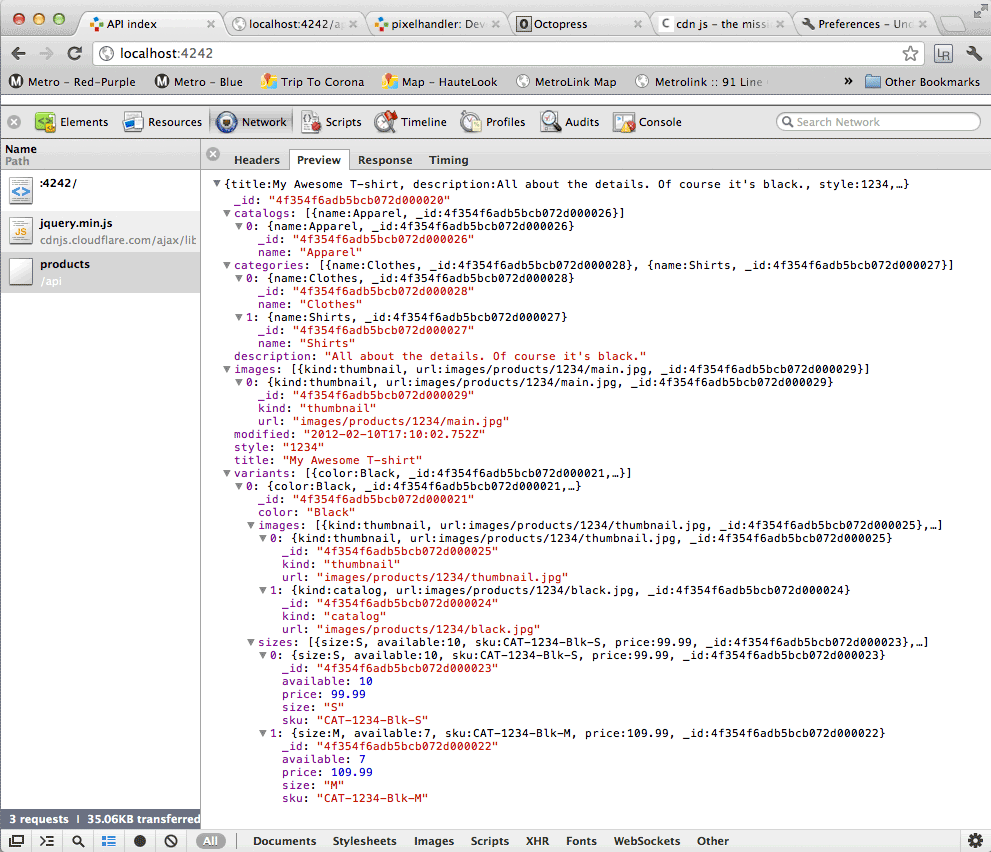
In my browser this looks like these two screenshot:
Ready to post using the console…
Server response in the network tab…
Bulk Actions for UPDATE and DELETE
Finally to finish up the actions needed in the design for the products web service I added the bulk actions to remove all products at once and also to update many products in a PUT request.
app.delete('/api/products', function (req, res) {
  ProductModel.remove(function (err) {
    if (!err) {
      console.log("removed");
      return res.send('');
    } else {
      console.log(err);
    }
  });
});


app.put('/api/products', function (req, res) {
    var i, len = 0;
    console.log("is Array req.body.products");
    console.log(Array.isArray(req.body.products));
    console.log("PUT: (products)");
    console.log(req.body.products);
    if (Array.isArray(req.body.products)) {
        len = req.body.products.length;
    }
    for (i = 0; i < len; i++) {
        console.log("UPDATE product by id:");
        for (var id in req.body.products[i]) {
            console.log(id);
        }
        ProductModel.update({ "_id": id }, req.body.products[i][id], function (err, numAffected) {
            if (err) {
                console.log("Error on update");
                console.log(err);
            } else {
                console.log("updated num: " + numAffected);
            }
        });
    }
    return res.send(req.body.products);
});
See the Gist links that follow for sample scripts to create many products (fixtures) and also the bulk update with single AJAX PUT request.
The app.js, index.html and jQuery AJAX snippets developed in this tutorial
The Source Code for This Tutorial is on GitHub as a Gist:
- Develop a RESTful API Using Node.js With Express and Mongoose
- Fixtures - example AJAX posts to create products
- Sample script for bulk update of products
The application file:
var application_root = __dirname,
    express = require("express"),
    path = require("path"),
    mongoose = require('mongoose');

var app = express.createServer();

// database

mongoose.connect('mongodb://localhost/ecomm_database');

// config

app.configure(function () {
  app.use(express.bodyParser());
  app.use(express.methodOverride());
  app.use(app.router);
  app.use(express.static(path.join(application_root, "public")));
  app.use(express.errorHandler({ dumpExceptions: true, showStack: true }));
});

var Schema = mongoose.Schema; //Schema.ObjectId

// Schemas

var Sizes = new Schema({
    size: { type: String, required: true },
    available: { type: Number, required: true, min: 0, max: 1000 },
    sku: {
        type: String,
        required: true,
        validate: [/[a-zA-Z0-9]/, 'Product sku should only have letters and numbers']
    },
    price: { type: Number, required: true, min: 0 }
});

var Images = new Schema({
    kind: {
        type: String,
        enum: ['thumbnail', 'catalog', 'detail', 'zoom'],
        required: true
    },
    url: { type: String, required: true }
});

var Variants = new Schema({
    color: String,
    images: [Images],
    sizes: [Sizes]
});

var Categories = new Schema({
    name: String
});

var Catalogs = new Schema({
    name: String
});

// Product Model

var Product = new Schema({
    title: { type: String, required: true },
    description: { type: String, required: true },
    style: { type: String, unique: true },
    images: [Images],
    categories: [Categories],
    catalogs: [Catalogs],
    variants: [Variants],
    modified: { type: Date, default: Date.now }
});

// validation

Product.path('title').validate(function (v) {
    console.log("validate title");
    console.log(v);
    return v.length > 10 && v.length < 70;
});

Product.path('style').validate(function (v) {
    console.log("validate style");
    console.log(v);
    return v.length < 40;
}, 'Product style attribute is should be less than 40 characters');

Product.path('description').validate(function (v) {
    console.log("validate description");
    console.log(v);
    return v.length > 10;
}, 'Product description should be more than 10 characters');

var ProductModel = mongoose.model('Product', Product);

/* Product Document
[
{
  "title": "My Awesome T-shirt",
  "description": "All about the details. Of course it's black.",
  "images": [
    {
      "kind": "thumbnail",
      "url": "images/products/1234/main.jpg"
    }
  ],
  "categories": [
      { "name": "Clothes" },
      { "name": "Shirts" }
  ],
  "style": "1234",
  "variants": [
    {
      "color": "Black",
      "images": [
        {
          "kind": "thumbnail",
          "url": "images/products/1234/thumbnail.jpg"
        },
        {
          "kind": "catalog",
          "url": "images/products/1234/black.jpg"
        }
      ],
      "sizes": [
        {
          "size": "S",
          "available": 10,
          "sku": "CAT-1234-Blk-S",
          "price": 99.99
        },
        {
          "size": "M",
          "available": 7,
          "sku": "CAT-1234-Blk-M",
          "price": 109.99
        }
      ]
    }
  ],
  "catalogs": [
      { "name": "Apparel" }
  ]
}
]
*/


// REST api

app.get('/api', function (req, res) {
  res.send('Ecomm API is running');
});

// POST to CREATE
app.post('/api/products', function (req, res) {
  var product;
  console.log("POST: ");
  console.log(req.body);
  product = new ProductModel({
    title: req.body.title,
    description: req.body.description,
    style: req.body.style,
    images: req.body.images,
    categories: req.body.categories,
    catalogs: req.body.catalogs,
    variants: req.body.variants
  });
  product.save(function (err) {
    if (!err) {
      return console.log("created");
    } else {
      return console.log(err);
    }
  });
  return res.send(product);
});

// PUT to UPDATE

// Bulk update
app.put('/api/products', function (req, res) {
    var i, len = 0;
    console.log("is Array req.body.products");
    console.log(Array.isArray(req.body.products));
    console.log("PUT: (products)");
    console.log(req.body.products);
    if (Array.isArray(req.body.products)) {
        len = req.body.products.length;
    }
    for (i = 0; i < len; i++) {
        console.log("UPDATE product by id:");
        for (var id in req.body.products[i]) {
            console.log(id);
        }
        ProductModel.update({ "_id": id }, req.body.products[i][id], function (err, numAffected) {
            if (err) {
                console.log("Error on update");
                console.log(err);
            } else {
                console.log("updated num: " + numAffected);
            }
        });
    }
    return res.send(req.body.products);
});

// Single update
app.put('/api/products/:id', function (req, res) {
  return ProductModel.findById(req.params.id, function (err, product) {
    product.title = req.body.title;
    product.description = req.body.description;
    product.style = req.body.style;
    product.images = req.body.images;
    product.categories = req.body.categories;
    product.catalogs = req.body.catalogs;
    product.variants = req.body.variants;
    return product.save(function (err) {
      if (!err) {
        console.log("updated");
      } else {
        console.log(err);
      }
      return res.send(product);
    });
  });
});

// GET to READ

// List products
app.get('/api/products', function (req, res) {
  return ProductModel.find(function (err, products) {
    if (!err) {
      return res.send(products);
    } else {
      return console.log(err);
    }
  });
});

// Single product
app.get('/api/products/:id', function (req, res) {
  return ProductModel.findById(req.params.id, function (err, product) {
    if (!err) {
      return res.send(product);
    } else {
      return console.log(err);
    }
  });
});

// DELETE to DESTROY

// Bulk destroy all products
app.delete('/api/products', function (req, res) {
  ProductModel.remove(function (err) {
    if (!err) {
      console.log("removed");
      return res.send('');
    } else {
      console.log(err);
    }
  });
});

// remove a single product
app.delete('/api/products/:id', function (req, res) {
  return ProductModel.findById(req.params.id, function (err, product) {
    return product.remove(function (err) {
      if (!err) {
        console.log("removed");
        return res.send('');
      } else {
        console.log(err);
      }
    });
  });
});

// launch server

app.listen(4242);
Also in the app.js gist (above), I added code to validate the product model
using Mongoose.
The index file (inside /public directory):
<!DOCTYPE html>
<html lang="en">
  <head>
    <meta charset="utf-8">
    <title>API index</title>
  </head>
  <body>
    <section>
      <h1>Nouns...</h1>
      <p>
        /products<br>
        /products/:id
      </p>
    </section>
    <script src="http://cdnjs.cloudflare.com/ajax/libs/jquery/1.7.1/jquery.min.js"></script>
  </body>
</html>
Some jQuery AJAX snippets to fiddle with the API:
// jQuery snippets used in the console to use the REST api created with app.js

// CREATE

jQuery.post("/api/products", {
  "title": "My Awesome T-shirt",
  "description": "All about the details. Of course it's black.",
  "images": [
    {
      "kind": "thumbnail",
      "url": "images/products/1234/main.jpg"
    }
  ],
  "categories": [
      { "name": "Clothes" },
      { "name": "Shirts" }
  ],
  "style": "1234",
  "variants": [
    {
      "color": "Black",
      "images": [
        {
          "kind": "thumbnail",
          "url": "images/products/1234/thumbnail.jpg"
        },
        {
          "kind": "catalog",
          "url": "images/products/1234/black.jpg"
        }
      ],
      "sizes": [
        {
          "size": "S",
          "available": 10,
          "sku": "CAT-1234-Blk-S",
          "price": 99.99
        },
        {
          "size": "M",
          "available": 7,
          "sku": "CAT-1234-Blk-M",
          "price": 109.99
        }
      ]
    }
  ],
  "catalogs": [
      { "name": "Apparel" }
  ]
}, function(data, textStatus, jqXHR) {
    console.log("Post resposne:"); console.dir(data); console.log(textStatus); console.dir(jqXHR);
});

// generated a product document with automatically assigned ID, e.g. 4f34734d21289c1c28000007


// READ

jQuery.get("/api/products/", function(data, textStatus, jqXHR) {
    console.log("Post resposne:");
    console.dir(data);
    console.log(textStatus);
    console.dir(jqXHR);
});

jQuery.get("/api/products/4f34734d21289c1c28000007", function(data, textStatus, jqXHR) {
    console.log("Post resposne:");
    console.dir(data);
    console.log(textStatus);
    console.dir(jqXHR);
});

// UPDATE

jQuery.ajax({
    url: "/api/products/4f34734d21289c1c28000007",
    type: "PUT",
    data: {
      "title": "My Awesome T-shirt",
      "description": "All about the details. Of course it's black, and longsleeve.",
      "images": [
        {
          "kind": "thumbnail",
          "url": "images/products/1234/main.jpg"
        }
      ],
      "categories": [
          { "name": "Clothes" },
          { "name": "Shirts" }
      ],
      "style": "1234",
      "variants": [
        {
          "color": "Black",
          "images": [
            {
              "kind": "zoom",
              "url": "images/products/1234/zoom.jpg"
            }
          ],
          "sizes": [
            {
              "size": "L",
              "available": 77,
              "sku": "CAT-1234-Blk-L",
              "price": 99.99
            }
          ]
        }
      ],
      "catalogs": [
          { "name": "Apparel" }
      ]
    },
    success: function(data, textStatus, jqXHR) {
        console.log("PUT resposne:");
        console.dir(data);
        console.log(textStatus);
        console.dir(jqXHR);
    }
});

// Delete

jQuery.ajax({url: "/api/products/4f34734d21289c1c28000007", type: "DELETE", success: function(data, textStatus, jqXHR) { console.dir(data); }});
Post Hoc
This tutorial came about as a desire to develop with a local API. Using a local API, I can develop a client application with Backbone.js and utilize the asynchronous behaviors that come with the API. I am not suggesting that anyone uses this tutorial to build a RESTful API for a production ecommerce application. However, I do advocate developing with a local API rather then just mocking a server without asynchronous interations with JSON data. If you are not working with a RESTful API and are not consuming data using AJAX, in a few hours you can be.
JavaScript runs in so many applications, and since I already know JavaScript I would rather fiddle with Node.js than build an API for my local development needs in PHP or Ruby. Also, this exercise helps me to understand more about JSON, REST and jQuery AJAX development. Getting to know these technologies and developing solid skills using asynchronous behavior, necessary to build HTML5 apps for desktop and/or mobile browsers.
Completing this tutorial will likely take a few hours, even longer if you do not have node and npm running on your development environment.
Reference
- API design nouns are good, verbs are bad.
- Installing Node.js
- npm is a package manager for node.
- Models are defined by passing a Schema instance to mongoose.model
- SchemaTypes take care of validation, casting, defaults, and other general options in our models
- Embedded documents are documents with schemas of their own that are part of other documents
- Backbone Todo boilerplates demonstrating integration with Node.js, Express, MongoDB
- MongoDB (from 'humongous') - Document-oriented storage
- Mongoose is a MongoDB object modeling tool designed to work in an asynchronous environment.
- High performance, high class Web development for Node.js
- npm install express
- Using Node.js, Express, Mongoose and MongoDB